Remote access to OT equipment without an open inbound port
AdminKit OT Remote Access is a planned outbound-only tunnel for reaching PLCs, HMIs, and OPC UA devices for maintenance, without opening any inbound port on the site firewall, aimed at factories that currently rely on port-forwarded VNC, RDP, or Modbus access and want sessions recorded and limited to a defined maintenance window instead of left open indefinitely.
Updated October 21, 2026
The problem
Keeping PLCs, HMIs, and OPC UA devices reachable for vendor maintenance often means opening an inbound port on the site firewall and forwarding it to the device, sometimes paired with a VNC or RDP session. That path stays open as long as someone remembers it’s there, which in practice can be a long time.
Industrial protocols were generally built for isolated plant networks, not the open internet, and many don’t include strong authentication of their own. Once a port is forwarded, anything that can reach it from outside can usually interact with the device the same way an authorized technician would.
There’s also often no record of who connected, when, or what they did once inside. If something goes wrong during a maintenance session, there’s little to look back on.
How it works
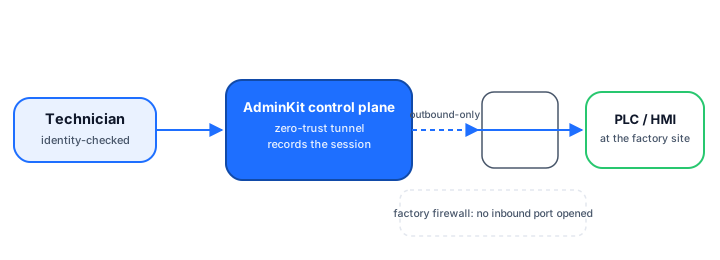
The plan is for a small agent at the factory site to make an outbound-only connection to AdminKit’s control plane, so nothing needs to be opened on the site firewall for a technician to reach it. A technician connects through the control plane, which routes the session to the site agent and on to the target PLC or HMI. The plan also includes recording sessions and optionally limiting access to a defined maintenance window.
Who it’s for
- Factories and OT sites currently using port-forwarded VNC, RDP, or Modbus access for vendor maintenance.
- System integrators who manage remote access to multiple client sites and want a consistent, auditable way to do it.
- Plant operators who want maintenance access limited to specific time windows rather than left open indefinitely.
What exists today, what’s planned
| Capability | Status |
|---|---|
| Check if a Modbus TCP device on a verified asset is exposed (modbus-check) | Free today |
| Outbound-only site agent and control plane | Early access |
| Session recording for audit and evidence | In development |
| Defined maintenance windows | In development |
This is a later-stage product than AdminKit’s other planned layers, and honestly further from launch. The modbus-check tool only reports exposure on an asset you’ve already verified you own; it does not open, close, or alter any connection to the device.
Frequently asked questions
Is OT Remote Access available now?
No. Of AdminKit's planned layers, this one is furthest from launch. Today you can check whether a Modbus TCP device on an asset you've verified you own is exposed, using the free modbus-check tool.
Why is port-forwarding to a PLC or HMI a problem?
Port-forwarding opens an inbound path from the internet straight to the device. Industrial protocols like Modbus TCP were generally not designed with authentication in mind, so anything that can reach the open port can often interact with the device directly.
How would the outbound-only tunnel work?
The plan is for a small agent installed at the factory site to connect outward to AdminKit's control plane. Because the connection is initiated from inside the site, there's no need to open an inbound port on the site firewall.
Would sessions be recorded?
Recording sessions for audit and evidence purposes is part of the plan, along with optionally restricting access to a defined maintenance window.
Who typically needs this?
Factories and other OT sites that currently rely on ad-hoc port-forwarded VNC, RDP, or Modbus access for vendor or technician maintenance, and system integrators who manage that access for clients.
Want early access to OT Remote Access for Factories | AdminKit?
Tell us about your setup and we will reach out when it is ready for you — no spam, no newsletter.