Protective DNS for devices that can't protect themselves
AdminKit Protective DNS is a planned resolver that blocks known-malicious domains and flags unusual lookup patterns per device, so a compromised camera or thermostat can't quietly call home, built for households, shops, and small industrial sites that currently have no visibility into what their devices are resolving and want that filtering without buying new hardware.
Updated October 21, 2026
The problem
Most devices on a home, shop, or factory network resolve DNS through whatever the router hands out, usually without any filtering at all. If a device is compromised, one of the first things it typically does is look up a domain to fetch instructions or exfiltrate data. A resolver that doesn’t check what it’s being asked to resolve has no way to catch that.
Smart TVs, cameras, point-of-sale terminals, and sensors rarely run endpoint security software, so there’s no agent on the device itself watching for this. The network layer is often the only place left to notice when a device starts querying domains it has no business talking to.
Most people also don’t know which DNS resolver their devices are actually using, or whether it does any filtering at all. ISP-provided resolvers and factory-default router settings usually apply no protective logic.
How it works
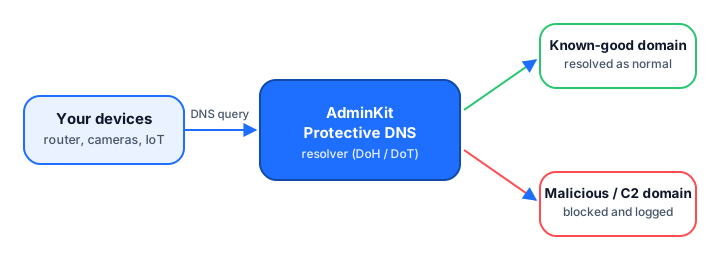
The plan is for devices (or a router) to send DNS queries to the AdminKit resolver instead of an unfiltered one. The resolver checks each query against lists of known-malicious and command-and-control domains, returns an answer for everything else, and logs what it blocked so you can review it later. Per-device anomaly detection — noticing when a device suddenly starts querying domains unlike its usual pattern — is also part of the plan.
Who it’s for
- Households who want their smart devices and IoT gadgets filtered without buying new hardware.
- Shops and small offices with point-of-sale systems or security cameras on the same network as everything else.
- Factories and small industrial sites that want a lightweight way to catch devices reaching out to unexpected domains.
- Anyone who currently has no visibility into what their devices are resolving.
What exists today, what’s planned
| Capability | Status |
|---|---|
| Check what DNS resolver you’re currently using (dns-resolver-test) | Free today |
| Look up any domain’s records (dns-lookup) | Free today |
| Hosted resolver that blocks known-malicious domains | Early access |
| Per-device blocking and reporting | In development |
| Home Assistant add-on | In development |
| OpenWrt package | In development |
Protective DNS only ever sees the domain names sent to the resolver you configure, nothing else. If a device uses a hardcoded DNS server or a different protocol entirely, those queries won’t pass through it, and there’s nothing for it to check.
Frequently asked questions
Is AdminKit Protective DNS live yet?
No. It is early access / in development. Today you can use the free dns-resolver-test and dns-lookup tools, which check your current setup but do not filter traffic.
What will Protective DNS actually see?
Only the domain names queried through the resolver you point your devices at. It will not see page content, IP payloads, or any traffic that bypasses the resolver.
Do I need to replace my router?
No. The plan is for devices or your router to point their DNS settings at the AdminKit resolver, the same way you'd point them at any other DNS provider.
Can it tell me which device made a bad query?
Only if your network already separates devices, for example with distinct VLANs or per-device DNS settings. If every device shares one DNS path, you'll get one combined view instead of a per-device breakdown.
Will there be a Home Assistant or OpenWrt option?
A Home Assistant add-on and an OpenWrt package are both planned, so the resolver can sit close to home and small-office networks that already run that software. Neither exists yet.
Want early access to Protective DNS for Devices | AdminKit?
Tell us about your setup and we will reach out when it is ready for you — no spam, no newsletter.